Play: AI-generated mini-games as Gems
Play (#/play) turns your work into small, self-contained HTML mini-games —
built by chatting with a coding agent — and treats each one as a first-class Gem you
can version, share, and publish. A game about replaying your best session, a
skill-runner, a bit of project fun: each is a single sealed HTML file and an
installable game Gem at the same time.
Play has three views, all under the one #/play route:
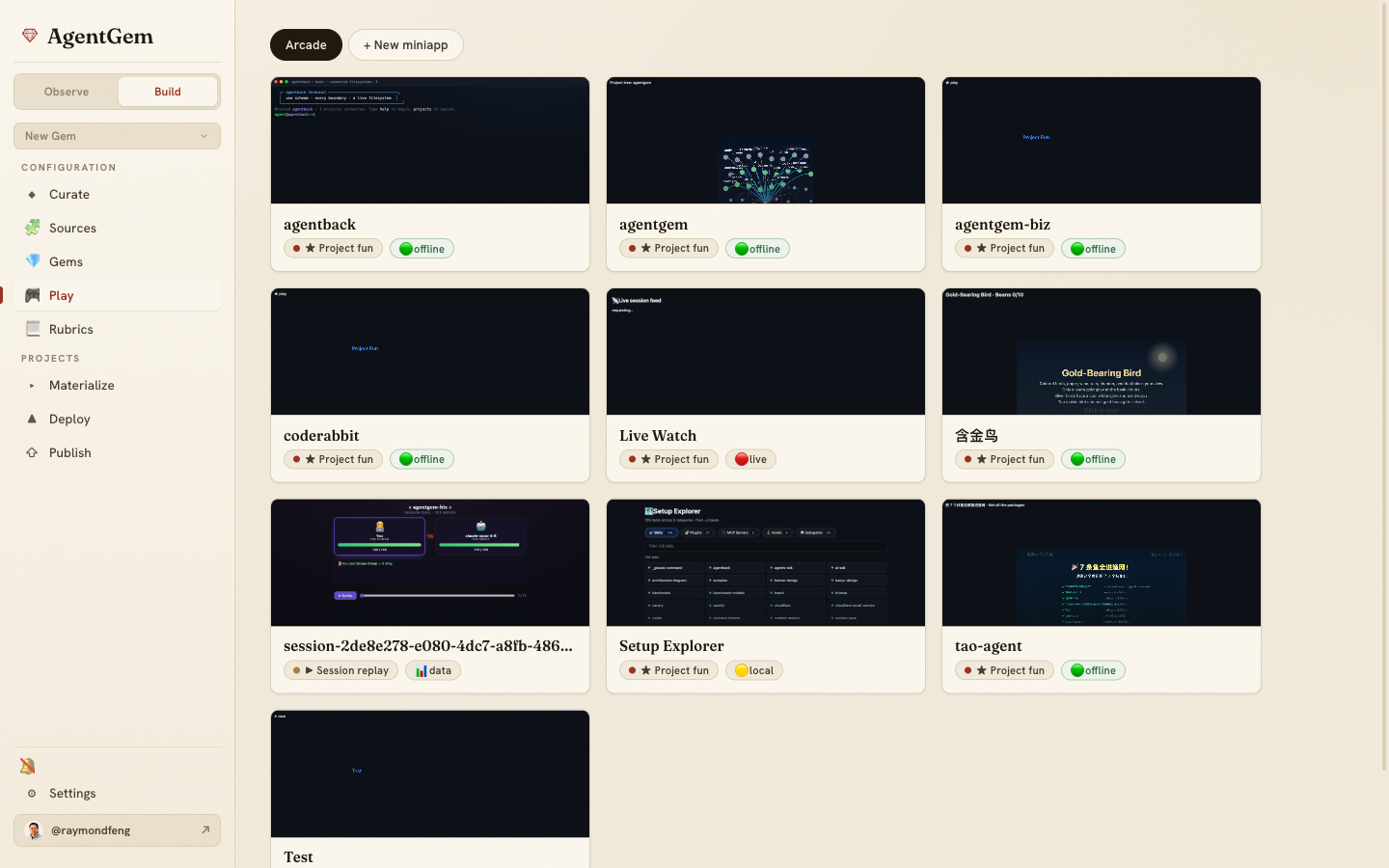
Arcade — browse and play
The Arcade is a grid of your mini-games. Each card renders a live, click-through thumbnail of the actual game (lazily loaded), with a 🟢 offline pill for games that need nothing from the host and capability pills for ones that ask for live data. Click a card to open it in Studio.
Composer — start a new miniapp
+ New miniapp opens the Composer, where you pick what to seed the game from:
- Project — build something around one of your repos.
- Session — turn a past session into a replay.
- Skill — a runner for one of your skills.
- HTML — import an existing single-file game.
- Blank — start from scratch.
Composer doesn't edit the game; it creates it and hands off to Studio.
Studio — build it by chatting
Studio is where the game gets made. A coding agent edits the single HTML file in
place while you describe what you want, with a live preview beside the chat. The
agent works within fixed // ==== AGENTGEM:GAME-LOGIC START/END ==== markers in a
scaffold, so the sealed shell around your game stays intact. Studio hosts the three
finishing actions — Save, Push to git, and Share — described below.
The full authoring contract is the agentgem-miniapp skill (in
skills/agentgem-miniapp/),
injected into the Studio agent's first turn so it knows the rules before it writes a
line.
The sealed model
A mini-game runs in a sealed iframe with a null origin — sandbox="allow-scripts"
with no same-origin access, under a strict Content-Security-Policy that allows inline
script and style and data: assets but no network at all. That's what makes a
game safe to run straight from the marketplace: it can't call home, read cookies, or
reach your machine.
Because the runtime is sealed, a game is admitted by a save-time gate (the
"seal") that rejects anything that wouldn't work — external src/href, bare module
imports, fetch/WebSocket/XMLHttpRequest and friends — caps the bundle at
1.5 MB, and smoke-loads it to be sure it doesn't throw. If a save fails the seal,
Studio shows an actionable banner with a Fix with agent button that hands the
failure straight back to the agent to correct.
Seed data (the session, project, or skill you built from) is baked into the page as an
inert <script id="game-data" type="application/json"> block in the <head>, scrubbed
for home paths and common token shapes on the way in. A game that needs live data
declares it and receives it from a trusted host over the MCP Apps ui/*
JSON-RPC protocol via an injected window.agentgemApp client — never over the
network. Capabilities are declared in the game's meta.json
needs: session-data (auto-approved), and the consent-gated local-project-access,
live-session-events, and invoke-agent.
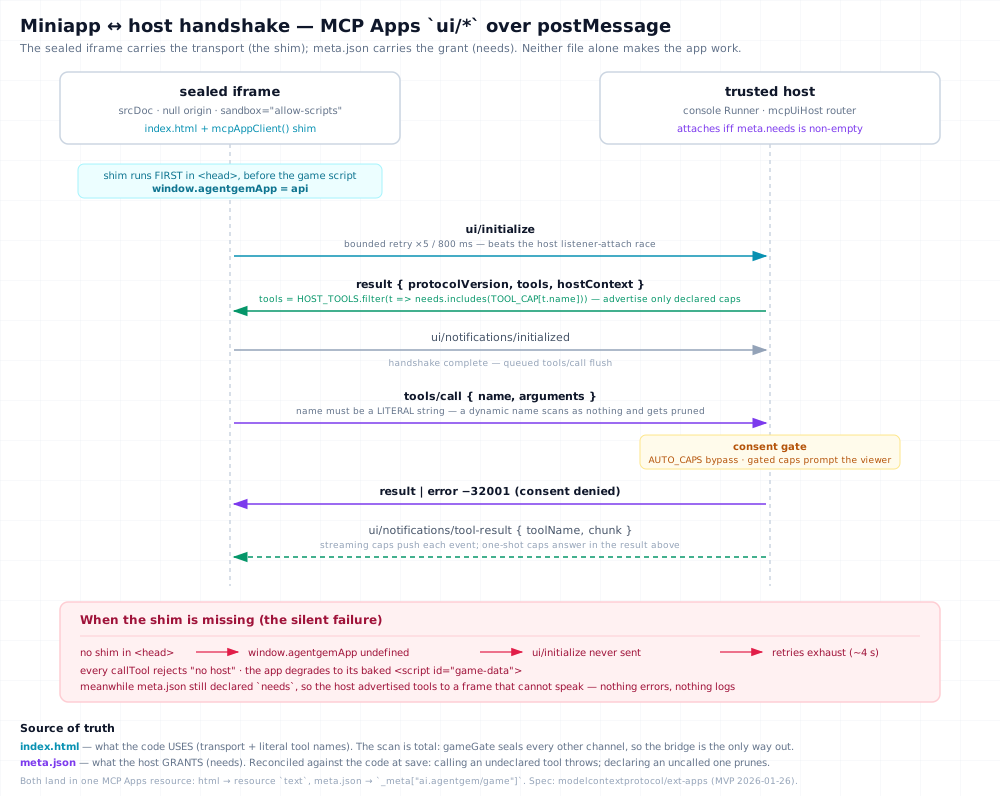
Diagram:
diagrams/miniapp-host-handshake.svg· PNG · interactive HTML (Copy / PNG / PDF export)
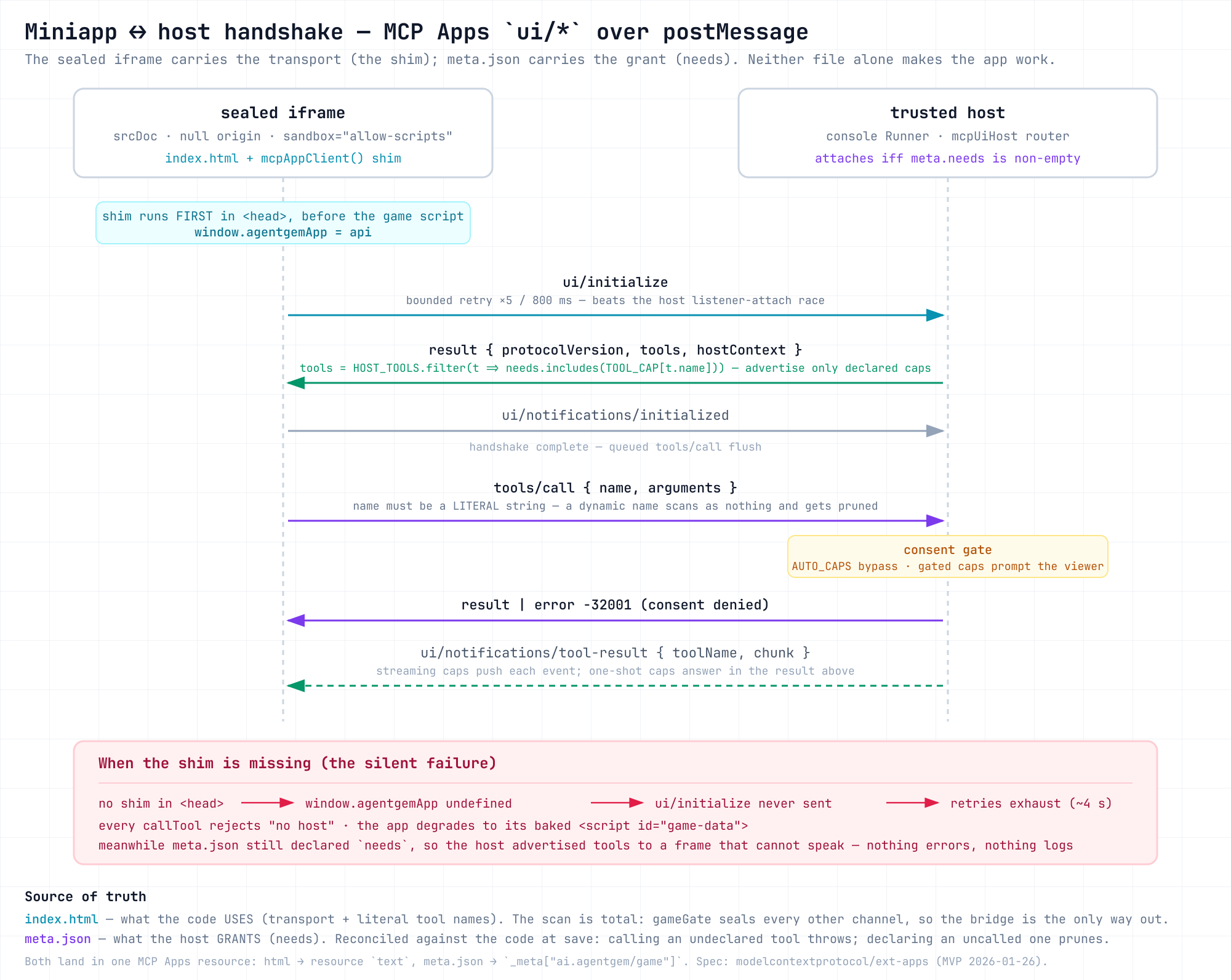
The two files carry different halves of the same contract, and neither one alone makes
the app work. index.html carries the transport — the injected client shim, which
must run before the game's own script so window.agentgemApp exists when it's needed.
meta.json carries the grant — the host only attaches when needs is non-empty, and
answers ui/initialize advertising exactly the declared capabilities. A bundle that
declares needs but carries no shim never sends ui/initialize at all: the handshake
retries exhaust, every callTool rejects with "no host", and the game quietly falls
back to its baked game-data while the host waits for a frame that cannot speak.
The git-backed registry
Your mini-games live in ~/.agentgem/miniapps/ (or $AGENTGEM_HOME/miniapps),
one directory per game holding its <name>.html and a meta.json. That directory
is a git repository, and versioning is git — every save, seed, import, and
in-progress checkpoint is a commit, so you have full history and can push the whole
registry to a remote. (There's no separate numeric version to manage;
meta.engineVersion tracks the scaffold engine, not your edits.)
Save, push, and share
Studio's three actions are distinct:
- Save — runs the seal, writes the HTML +
meta.json, git-commits, and (re)writes the one-artifactgameGem. This is what makes the game real. - Push to git —
git pushof the whole miniapps registry to its remote, so your games are backed up and portable across machines. - Share — publishes the game to the public marketplace at
app.agentgem.ai, tagged
gameplus its genre. A capture step first grabs a screenshot of the running game so its link-preview and marketplace card show the real thing (see OG cards). You choose a visibility (Public / Unlisted / Private) and, for an existing key, whether to overwrite or cut a new version. Publishing requires an account (see Identity); if you're signed out, Studio connects you inline and then resumes the publish you started — no second click. On success it links your marketplace gem page.
Once published, a game lives in the marketplace arcade (app.agentgem.ai/) — an
early testbed, so treat it as a preview — where it's searchable by genre and tag,
counts plays, and plays offline: a sealed game carries everything it needs, so there is
no network to lose.
Connectors
A mini-app can declare mcpNeeds — MCP tools it wants to call. Nothing is
granted silently: at play time the console shows a consent card, and only after
you allow it does the host broker those MCP calls to the mini-app. The built-in
Repo Pulse demo ships as an mcpNeeds-only mini-app you can inspect. The full
connector contract lives in the miniapp spec.
The agentgem-play MCP server
Your games aren't locked to the console. The same sealed bundles are served to
any MCP Apps host by a
standalone MCP server that ships as a separate executable,
agentgem-play, installed on your PATH alongside agentgem. Point a
host's MCP config at it (it speaks MCP over stdio):
{
  "mcpServers": {
    "agentgem-play": { "command": "agentgem-play" }
  }
}
Every saved game (plus the built-in Protocol Inspector) appears as a
play_<name> launcher tool bound to a ui://agentgem/<name> resource — calling
the tool hands the host the game's sealed HTML to render in its own sandbox.
This is how a mini-game ends up playable inside Claude Code, Claude Desktop, or
a spatial canvas like pmx-canvas,
unchanged.
The endpoint is deliberately read-only: it serves each bundle and its declared
metadata, nothing else. External hosts don't get the console's capability
tools, so a game that asks for live data quietly falls back to its baked
game-data — exactly as it does in the marketplace. Offline games (the 🟢
pill) are indistinguishable from the console experience. The contract is
spec §A8.
On the desktop app
The embedded desktop console has the full Play experience — browse,
play, and remix mini-games — the same as npx.
Changing the miniapp platform itself, rather than playing or authoring? The
normative spec is miniapps/spec.md, and the design
decisions and lessons behind it are in
miniapps/evolution.md.