Getting started
AgentGem runs as a small local server. A browser can't read your agent's config directory (it's sandboxed), so AgentGem serves the introspection and Gem-building operations from your machine — over both HTTP and MCP — while keeping secrets on-device.
Prerequisites
- Node.js ≥ 24.
- A supported coding agent — Claude (
~/.claude), Codex, or Hermes — with skills, MCP servers, and instructions.
Run it
From the directory of the agent project you want to package, run it without installing:
npx @ninemind/agentgem         # npm
pnpm dlx @ninemind/agentgem    # pnpm
Or install the agentgem command globally:
npm install -g @ninemind/agentgem     # or: pnpm add -g @ninemind/agentgem
agentgem                              # --port to override (default 4317, also honors $PORT)
The server starts on 127.0.0.1 and prints its URL. Three surfaces come up from the same
contract:
| Path | What it is |
|---|---|
/ |
The Gem Builder web UI |
/explorer |
Swagger UI for the REST API (from the OpenAPI document) |
/mcp |
The MCP endpoint, so your local agent can call the same tools |
Build your first Gem
AgentGem is testbed-first: you point it at an agent project, then crystallize what's there into a Gem.
- Open a testbed. Open
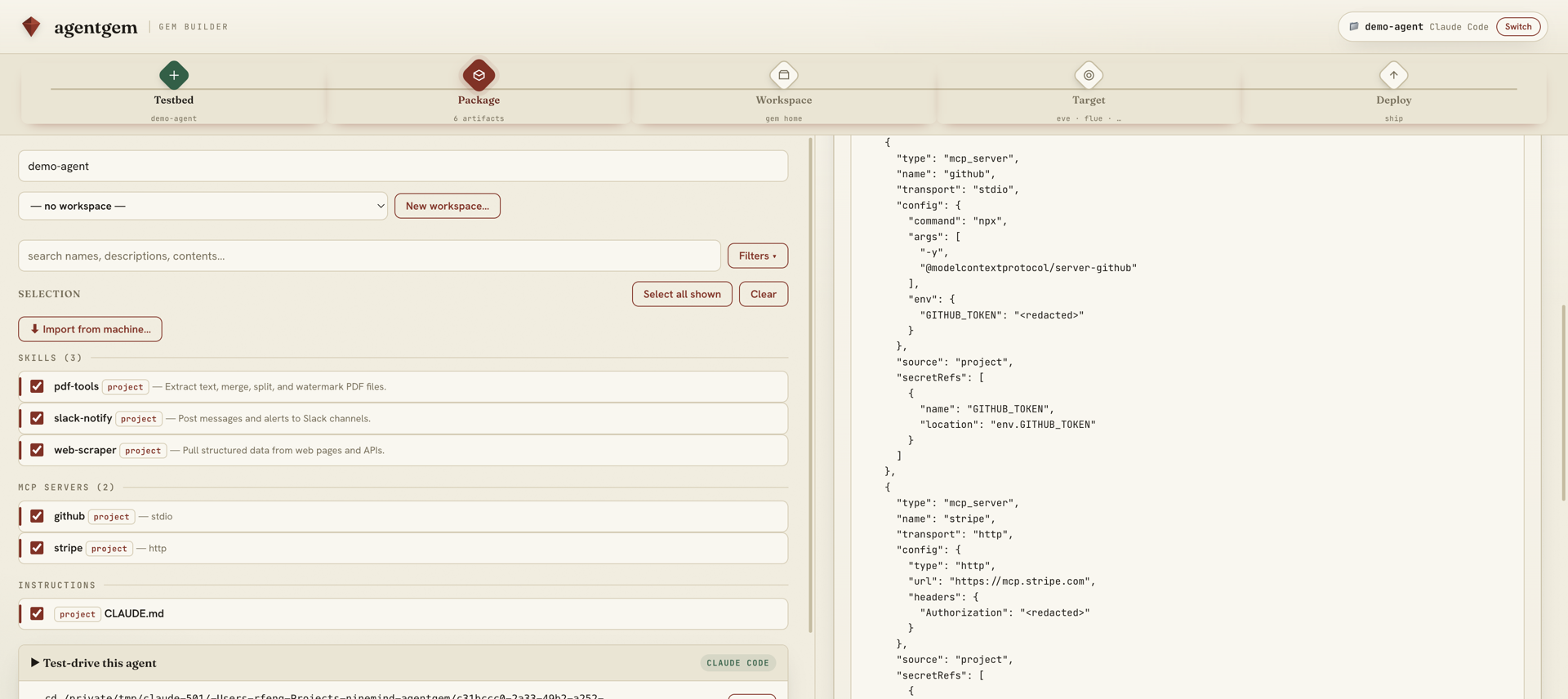
/and click Create / open testbed…. AgentGem detects the folder you launched from as a Claude/Codex project (it has a.claudeor.codex), and also lists projects discovered from your Claude/Codex session history. Pick one and click Use this. - Review what's there. The testbed's own skills, MCP servers, and instructions appear on the left. To pull in user-level (global) artifacts, click Import from machine… and select the ones you want.
- Select, and watch it seal. Tick the artifacts to bundle and name the Gem. The
Gem (live) panel re-renders the pretty-printed
gem.jsonon every change — with every secret already shown as<redacted>. - Take it further. Download
gem.json(the neutral source every target and the marketplace consume), test-drive the agent locally in the testbed, or publish it.
Targeting a different config directory
The API accepts a directory override for testing or non-default homes:
curl 'http://127.0.0.1:4317/api/inventory?dir=/path/to/.claude'
Calling it from your agent
Because every operation is also an MCP tool, your local agent can call inventory and
gem directly over /mcp — no browser required. This is the agent-native path: the same
contract the web page uses is available to the agent that's building the Gem.
From source
To hack on AgentGem, clone the repo. It's a pnpm project (npm works
too), and AgentBack uses legacy decorators, so it builds with tsc then runs dist/:
pnpm install     # or: npm install
pnpm dev         # or: npm run dev   — build + start in one step
pnpm test        # or: npm test      — tsc -b && vitest run
Next: read Concepts to understand what's inside a Gem, jump to Targets, or browse what others have published on the public marketplace (an early testbed — hosted data may be reset).