Context hygiene
Long agent sessions rot. The context window fills with re-read files, half-finished tangents, and tasks that bleed into each other, and the agent gets slower and less sharp the fuller it gets. AgentGem detects that bloat — cheaply, with no LLM in the loop — scores each session, tells you where the clean break is, and can nudge you in real time before a live session goes off the rails.
The whole thing is deterministic: pure scans over the session's tool/turn spine, no fs access and no model calls. The same report is reproducible every time.
What it detects
Five context-hygiene detectors run over a session's turns:
| Detector | Fires when… |
|---|---|
context-pinned |
the window sits pinned near the model's cap for most of the session |
cache-churn-late |
context churns hardest when it's fullest (the expensive end) |
task-sprawl |
one session covers many distinct task clusters |
task-pingpong |
the session keeps switching back and forth between tasks |
reread-churn |
files get re-read because they fell out of context |
Each fired factor subtracts a fixed weight from a hygiene score that starts at 100, and the score buckets into a verdict:
- bounded (≥ 72) — the window stayed lean.
- mixed (≥ 48) — some drift.
- bloated (< 48) — the session was fighting its own context.
(These are the context detectors. The related process-quality detectors —
retry-storm, thrash-loop, no-verify-finish, and friends — are covered under
Analyze → Process quality.)
The bloat curve and the cut point
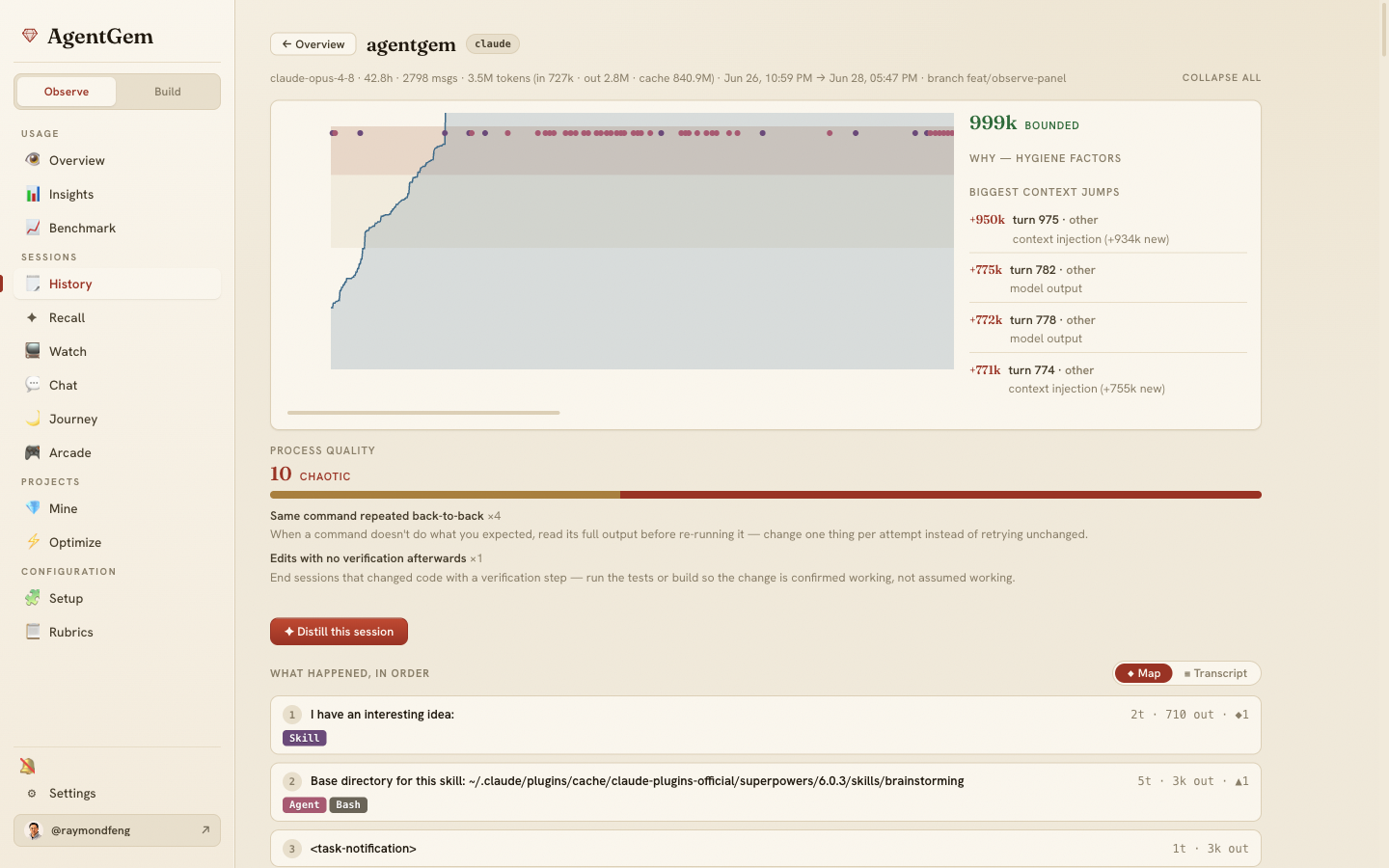
Behind the verdict is the bloat curve: the size of the context window, turn by turn, drawn against the model's cap. On top of it, a deterministic change-point pass segments the session into task episodes and picks the single "cut here at turn N" — the episode boundary with the largest jump in context across it. That's the point where, if you'd started a fresh session, each half would have stayed lean. It's a concrete, reproducible answer to "where should I have cleared context?"
The session timeline
Open any session from History (#/sessions) and drill into it
(#/sessions/<agent>/<session>). For Claude sessions the drill-down renders an SVG
context timeline:
- the bloat curve, with amber/red bands at 50% and 80% of the peak;
- shaded task-episode segments from the change-point pass;
- skill and subagent markers along the top, so you can see which loads pushed context up;
- the dashed "suggested cut at turn N" line;
- a side rail with the verdict, the hygiene factors that fired, the biggest context jumps (each attributed to a loaded skill, a folded-back subagent, an injection, or model output), and the task areas — where to cut.
Alongside it, a Map ⇄ Transcript toggle switches the body between a phase-by-phase Map of the session's tool and skill calls and the verbatim Transcript.
The leaderboard
Run the built-in hygiene (or context-hygiene) rubric from the Rubrics
panel (#/rubrics) and each session is ranked worst-first — most bloated at the
top — with its verdict, score, and the top factor that dragged it down. Each row links
straight to that session's timeline. It's the fast way to find which of your recent
sessions were the messiest.
Live nudges: the warm daemon
agentgem warm is a background precompute daemon that keeps AgentGem's caches
warm as your .claude files change — insight, scorecard, usage, and Recall caches —
so the console is instant instead of recomputing on every visit. It also raises the
context-hygiene alarm while you work:
agentgem warm --watch            # run the daemon; re-warm caches as sessions change
agentgem warm --watch --nudge    # also raise an OS notification when a live session gets heavy
With --nudge, each time a watched live session's verdict climbs to a heavier
level, AgentGem fires a native OS notification (macOS osascript, Linux
notify-send) titled "AgentGem — context is heavy" with the specific advice for
what's bloating it. It only fires on a worsening — no nagging while a session sits
at the same level.
To keep the daemon running across logins, install it as a service:
agentgem warm --install-service     # write a launchd (macOS) or systemd --user (Linux) unit
agentgem warm --uninstall-service   # remove it
--install-service prints the one command to enable the unit
(launchctl load … / systemctl --user enable --now agentgem-warm.service). It's
macOS and Linux only.